Opening an account with XM is relatively simple, but many beginners make costly mistakes during the registration process — especially when selecting their account type, trading platform, and base currency.
This guide explains exactly how to open an XM account step by step, what you should prepare before registering, and the most important settings you must choose correctly the first time.
By the end of this guide, you’ll know:
- How to create an XM trading account
- Which XM account type is best for beginners
- Which settings cannot be changed later
- How to avoid common registration mistakes
- How to create additional XM accounts if needed
XM is one of the most popular Forex brokers globally, offering access to Forex, commodities, indices, stocks, metals, and crypto CFDs with low minimum deposits and beginner-friendly trading conditions.
- Why Traders Choose XM
- Recommended Preparation Before Opening an XM Account
- Step-by-Step: How to Open an XM Account
- Step 1 — Visit the Official XM Website
- Step 2 — Enter Your Basic Personal Information
- Step 3 — Choose Your Trading Platform
- Step 4 — Select Your XM Account Type
- Step 5 — Choose Your Account Base Currency
- Step 6 — Set Your Leverage
- Step 7 — Create Your Password and Complete Registration
- Step 8 — Verify Your Identity (KYC)
- What If You Chose the Wrong Account Type?
- Common XM Registration Mistakes to Avoid
- Is XM Beginner-Friendly?
- Final Thoughts — Should You Open an XM Account?
Why Traders Choose XM
Before opening an account, here are some of the main reasons traders choose XM:
- Low minimum deposit (from $5)
- MT4 and MT5 platform support
- Multiple account types for different trading styles
- Negative balance protection
- Beginner-friendly Micro account
- Tight spreads on Ultra Low accounts
- Fast registration and KYC process
XM also supports additional trading accounts under one client profile, which is extremely useful if you want to test different strategies or account settings later.
Recommended Preparation Before Opening an XM Account
Prepare the following before starting registration:
Personal Information
- Full legal name
- Date of birth
- Residential address
- Phone number
- Email address
Verification Documents (KYC)
XM requires identity verification before full account usage.
Prepare:
- Passport / Driver’s License / National ID
- Proof of address (utility bill or bank statement)
Most users complete verification within 24 hours.
Step-by-Step: How to Open an XM Account
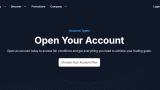
Step 1 — Visit the Official XM Website
Go to the official website:
Click the “Open an Account” button.

Step 2 — Enter Your Basic Personal Information
You’ll first enter:
- Country of residence
- Preferred language
- Full name
- Phone number
- Email address
Make sure all information matches your identity documents exactly.
Common Mistake to Avoid
Using abbreviated names or nicknames may delay KYC verification later.
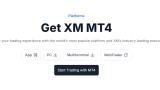
Step 3 — Choose Your Trading Platform
XM allows you to choose between:
- MT4
- MT5

Important Warning
Your platform selection cannot be changed later for that account.
If you choose MT4 but later want MT5, you must create an additional trading account.
Which Platform Should Beginners Choose?
MT4
Best for:
- Beginners
- Simple Forex trading
- EA compatibility
MT5
Best for:
- More advanced traders
- More instruments
- Faster backtesting features
For most beginners, MT4 is still the easier starting point.
Step 4 — Select Your XM Account Type
XM offers several account types.
Below is a simplified overview.

XM Account Types Explained
| Account Type | Best For | Main Feature |
|---|---|---|
| Micro Account | Beginners | Small trade sizes |
| Standard Account | General traders | Standard lot trading |
| Ultra Low Account | Active traders | Lower spreads |
| Shares Account | Stock investors | Real share trading |
Micro Account
Ideal for beginners because position sizes are smaller, helping reduce risk exposure.
Standard Account
Most common account type for regular Forex traders.
Ultra Low Account
Offers tighter spreads, making it more attractive for scalpers and active traders.
Shares Account
Designed mainly for stock trading and requires much larger capital.
Step 5 — Choose Your Account Base Currency
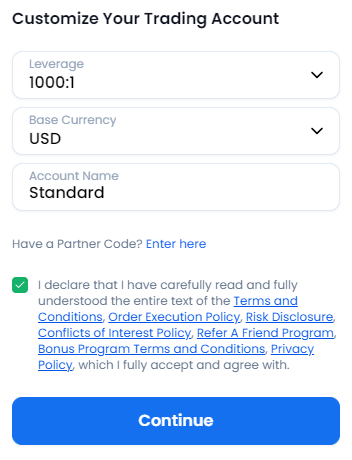
You’ll choose your account currency during registration.
Examples:
- USD
- EUR
- JPY
Extremely Important Warning
Your account base currency cannot be changed later.
This is one of the biggest mistakes beginners make.
Choose carefully because:
- Deposits and withdrawals may involve conversion fees
- Trading calculations will use this currency
- Bonus calculations may depend on it
Recommended Tip
Choose the same currency as:
- Your bank account
- Your primary payment method
Step 6 — Set Your Leverage
XM allows flexible leverage settings.

The good news:
Leverage CAN Be Changed Later
Unlike:
- Platform type
- Account type
- Base currency
Leverage settings are adjustable later through the client portal.
This means beginners do not need to stress too much during registration.
Beginner Recommendation
A moderate leverage setting is usually safer for new traders.

Step 7 — Create Your Password and Complete Registration
Set a secure password and submit the registration form.
You’ll then receive:
- Confirmation email
- Login credentials
- Access to XM Members Area
Step 8 — Verify Your Identity (KYC)
Upload:
- ID document
- Proof of address
Verification is usually completed quickly if documents are clear and valid.
Common KYC Problems
- Blurry images
- Cropped documents
- Mismatched addresses
- Expired IDs
What If You Chose the Wrong Account Type?
Good news:You can create additional XM trading accounts after registration.
This is extremely useful if:
- You selected the wrong platform
- You want another base currency
- You want to test different strategies
- You need separate risk management setups
XM automatically verifies additional accounts if your main account is already verified
Important Note About Maximum Account Limits
XM limits the number of trading accounts each client can open.
The exact limit may vary depending on region and account conditions, so always check the latest terms inside the XM Members Area or with customer support.
Common XM Registration Mistakes to Avoid
Choosing the Wrong Account Currency
This cannot be changed later.
Always think long term before selecting your base currency.
Selecting MT4 When You Actually Want MT5
Many beginners later realize they want:
- More instruments
- Better strategy testing
- Advanced features
At that point, they must create another account.
Using Excessive Leverage Immediately
High leverage attracts many beginners, but it also increases risk dramatically.
Several trader discussions online warn that overleveraging is one of the fastest ways beginners lose money.
Opening the Wrong Account Type
A common example:
- Beginners opening Ultra Low accounts without understanding spread differences
- Small account traders opening Standard instead of Micro
If unsure:Start with a Micro account.
Ignoring Verification Requirements
Incomplete KYC is one of the most common causes of delayed withdrawals across brokers.
Complete verification early.
Is XM Beginner-Friendly?
For most beginners, yes.
XM is particularly attractive because it offers:
- Low entry barriers
- Micro accounts
- MT4 support
- Educational materials
- Multiple account types
- Small minimum deposits
Many traders also view XM as a beginner-friendly environment for learning position sizing and risk management.
Final Thoughts — Should You Open an XM Account?
If you want a Forex broker with:
- Beginner-friendly account options
- Low minimum deposits
- MT4/MT5 support
- Flexible leverage
- Multiple account management
Then XM remains one of the most accessible brokers in 2026.
The key is choosing the correct settings during registration — especially:
- Platform
- Account type
- Base currency
Those are the settings that matter most because changing them later requires opening a new trading account.