Choosing the right trading platform is one of the first decisions to make when starting Forex trading. Your platform affects how easily you can analyse charts, place orders, manage positions and monitor the market.
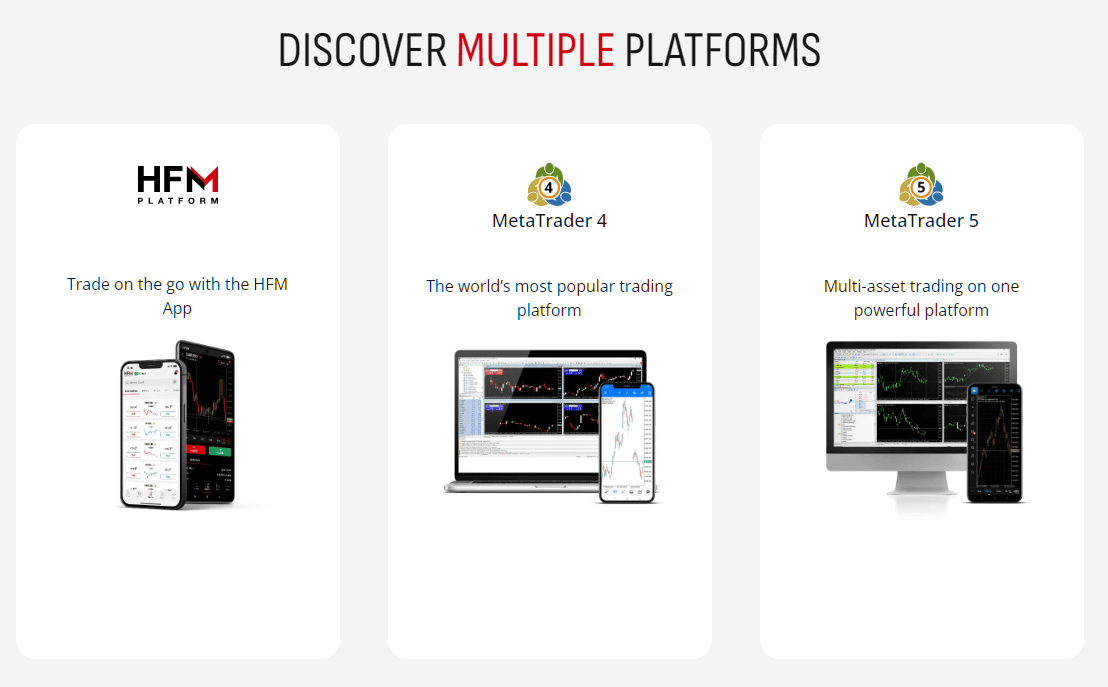
HFM offers four main trading options: HFM WebTrader, MetaTrader 4 (MT4), MetaTrader 5 (MT5), and the HFM App. Each is designed for a different type of trader, so the best choice depends on your experience, strategy and preferred device.
If you are new to Forex, you do not need to understand every technical feature before opening an account. The most important question is simple: which HFM trading platform fits the way you want to trade?
- HFM Trading Platforms at a Glance
- HFM WebTrader: Best for Beginners and Browser-Based Trading
- HFM MT4: Best for Forex, Scalping and EA Trading
- HFM MT5: Best for Advanced Analysis and Multi-Asset Trading
- HFM App: Best for Mobile Trading
- HFM Trading Platforms: Windows, Mac, iOS, Android and Web
- Can You Use HFM Platforms on Different Devices?
- Which HFM Trading Platform Is Best for Beginners?
- How to Start Trading With HFM
- HFM Trading Platform FAQ
- Final Verdict: Which HFM Trading Platform Should You Choose?
HFM Trading Platforms at a Glance
Here is a quick comparison of HFM’s current trading platforms.
| Platform | Best For | Main Strength | Access |
|---|---|---|---|
| HFM WebTrader | Beginners & technical traders | TradingView-powered charting and no installation | Web browser |
| MT4 | Forex, scalping & EA traders | Familiar interface and Expert Advisors | Desktop, mobile & web |
| MT5 | Advanced & multi-asset traders | More analytical tools and trading functions | Desktop, mobile & web |
| HFM App | Mobile-first traders | Simple trading and account management | iOS & Android |
Which Platform Should You Choose?
Best for beginners: HFM WebTrader
Best for EA and automated trading: MT4
Best for advanced trading: MT5
Best for smartphone trading: HFM App
The choice becomes much easier once you know what type of trader you want to be.
HFM WebTrader: Best for Beginners and Browser-Based Trading
HFM WebTrader is a web-based trading platform that can be accessed directly through a compatible browser. It is powered by TradingView and does not require you to install separate desktop software.
For someone completely new to Forex, this is one of the simplest ways to start.
You can open the platform from a computer or compatible mobile device, analyse price charts and manage trades without going through a software installation process.
Key Features of HFM WebTrader
HFM WebTrader focuses heavily on technical analysis and ease of access. Its main features include:
- TradingView-powered charts
- A wide selection of technical indicators
- Extensive analytical and drawing tools
- Multiple chart layouts
- Built-in economic calendar
- Real-time market information
- Browser-based access without installation
The platform is particularly useful if you frequently switch between computers or prefer not to install trading software.
Who Should Use HFM WebTrader?
WebTrader is a good choice for:
- Forex beginners
- Technical analysis traders
- Traders who prefer browser-based platforms
- Users who work across multiple computers
- Traders who want a simple way to start
If you are opening your first Forex account and are unsure which platform to use, WebTrader is a sensible starting point because you can focus on learning how to read charts and manage orders rather than configuring complicated software.
HFM MT4: Best for Forex, Scalping and EA Trading
MetaTrader 4 is one of the most established Forex trading platforms in the industry. HFM provides MT4 across desktop, mobile and web environments.
MT4 is particularly well known for its simple interface and extensive support for Expert Advisors (EAs), custom indicators and automated trading strategies.
Why Choose HFM MT4?
HFM MT4 provides the core tools needed for Forex trading, including:
- Multiple chart timeframes
- Technical indicators
- One-click trading
- Pending orders
- Custom indicators
- Expert Advisor support
- Desktop and mobile trading
The biggest advantage for many experienced traders is the EA ecosystem.
An Expert Advisor can automatically execute a predefined trading strategy according to programmed rules. This makes MT4 popular with algorithmic traders, scalpers and users who already have an automated trading system.
Who Should Use HFM MT4?
MT4 is particularly suitable for:
- Forex-focused traders
- Scalpers
- Day traders
- EA users
- Traders familiar with MetaTrader
- Traders who prefer a well-established platform
If you are completely new to Forex, MT4 is still relatively easy to learn. However, its biggest advantages become more apparent when you start using custom indicators or automated trading.
HFM provides MT4 access for Windows, Mac and Linux, as well as iOS, Android and web-based trading.
HFM MT5: Best for Advanced Analysis and Multi-Asset Trading
MetaTrader 5 is the newer generation of the MetaTrader platform. It offers a broader range of analytical tools, timeframes and trading functions than MT4.
HFM positions MT5 as a platform suitable for multi-asset trading, making it a strong choice for traders who want more than a basic Forex setup.
Why Choose HFM MT5?
HFM MT5 includes:
- More timeframes than MT4
- Advanced technical analysis tools
- Multiple order types
- Built-in economic calendar
- Expert Advisor support
- Multi-asset trading capabilities
- Desktop, mobile and web access
MT5 is particularly useful for traders who want to analyse markets in greater detail or diversify across different asset classes available through HFM.
Who Should Use HFM MT5?
MT5 is well suited to:
- Advanced Forex traders
- Multi-asset traders
- Swing traders
- Technical analysts
- Algorithmic traders
- Traders who want more analytical flexibility
If you are deciding between MT4 and MT5, MT5 is generally the better choice if you want more advanced tools and expect your trading needs to grow over time.
However, MT5 is not automatically the right choice for everyone. If you already rely on MT4 EAs or prefer the simpler MT4 environment, MT4 may be more practical.
One important point is that MT4 and MT5 accounts are separate. You cannot use an MT4 account directly on the MT5 platform. If you want to trade through MT5, you need an MT5 account.
HFM App: Best for Mobile Trading
The HFM App is designed for traders who prefer to manage their trading activities from a smartphone or tablet.
Available for iOS and Android, the app combines trading functions with account management, making it particularly convenient for traders who do not spend all day in front of a computer.
What Can You Do With the HFM App?
Depending on the account and available functionality, the HFM App allows users to:
- Open and close positions
- Modify trades
- Monitor real-time prices
- View charts
- Check trading history
- Manage accounts
- Manage funds
- Follow market information
- Access Copy Trading features
The app can also be used to access HFM’s MT4 and MT5 accounts, making it useful even if MetaTrader is your primary trading platform.
Who Should Use the HFM App?
The HFM App is ideal for:
- Beginners
- Smartphone-first traders
- Traders who frequently travel
- Users who want to monitor positions away from their computer
- Traders who prefer to manage trading and account functions from one mobile application
If you mainly trade from your smartphone, the HFM App is the most convenient option among HFM’s available platforms.
HFM Trading Platforms: Windows, Mac, iOS, Android and Web
HFM provides several ways to access its trading environment, so you are not tied to a single device.
| Platform | Windows | Mac | iOS | Android | Web |
|---|---|---|---|---|---|
| HFM WebTrader | ✓ | ✓ | ✓* | ✓* | ✓ |
| MT4 | ✓ | ✓ | ✓ | ✓ | ✓ |
| MT5 | ✓ | ✓ | ✓ | ✓ | ✓ |
| HFM App | — | — | ✓ | ✓ | — |
*WebTrader is browser-based, meaning you do not need a dedicated application. It can be accessed through a compatible browser on supported computers and mobile devices.
For desktop trading, MT4 and MT5 are the main choices if you want dedicated MetaTrader software. For browser-based trading, WebTrader is the more convenient option. For smartphone users, the HFM App provides a dedicated mobile environment.
Can You Use HFM Platforms on Different Devices?
Yes. HFM’s platform ecosystem gives traders considerable flexibility.
For example, you could use:
- MT4 or MT5 on your computer for detailed analysis
- HFM App on your smartphone to monitor positions while away
- WebTrader when you need browser-based access from another device
HFM also states that MT4 and MT5 accounts can be accessed through WebTrader and the HFM App where supported.
However, remember that MT4 and MT5 are different account types. An MT4 account cannot be used directly on MT5, and vice versa.
This is one reason why choosing the appropriate platform before opening your trading account is important.
Which HFM Trading Platform Is Best for Beginners?
If you are completely new to Forex, choosing a platform can seem more complicated than it really is.
Choose HFM WebTrader for simplicity
WebTrader is a good starting point if you want:
- Browser-based access
- Easy chart analysis
- No software installation
- A straightforward trading environment
Choose HFM App for mobile trading
The HFM App is better if your smartphone will be your primary trading device.
Choose MT4 if you want to learn EA trading
If you are interested in Expert Advisors or automated trading, MT4 is worth considering from the beginning.
Choose MT5 if you want room to grow
MT5 is a strong choice if you expect to explore advanced technical analysis or multiple asset classes as your trading experience develops.
For most first-time traders, WebTrader and the HFM App are the easiest places to start, while MT4 and MT5 become more attractive when you need specific MetaTrader features.
How to Start Trading With HFM
Once you have decided which platform fits your needs, getting started is straightforward.
Step 1: Open an HFM Account
Choose the appropriate HFM account and provide the required information.
Step 2: Select Your Trading Platform
Decide whether you want to use WebTrader, MT4, MT5 or the HFM App.
If you want MT4 or MT5, make sure you select the correct account type because they are separate platforms.
Step 3: Verify Your Account
Complete HFM’s required verification process before using the account for live trading.
Step 4: Fund Your Account
Once your account is ready, choose an available deposit method and fund your trading account.
Step 5: Start Trading
Log in to your chosen platform, select your market and begin trading according to your strategy and risk management plan.
If you are new to Forex, starting with a Demo Account can be a sensible first step. It lets you learn how orders, charts and positions work before committing real money.


HFM Trading Platform FAQ
What trading platforms does HFM offer?
HFM currently offers HFM WebTrader, MetaTrader 4 (MT4), MetaTrader 5 (MT5) and the HFM App.
Which HFM platform is best for beginners?
HFM WebTrader is a strong choice for beginners who want a simple browser-based experience, while the HFM App is ideal for those who prefer smartphone trading.
Does HFM support MT4 and MT5?
Yes. HFM provides both MT4 and MT5. They are separate trading platforms and use separate account types.
Can I trade HFM on an iPhone or Android phone?
Yes. The HFM App is available for iOS and Android, while MT4 and MT5 also offer mobile versions.
Does HFM support Expert Advisors?
Yes. Both MT4 and MT5 support Expert Advisors, making them suitable for automated trading.
Can I use HFM without downloading software?
Yes. HFM WebTrader provides browser-based access, so you can trade without installing a separate desktop trading platform.
Final Verdict: Which HFM Trading Platform Should You Choose?
HFM provides four main trading options, each with a clear purpose.
HFM WebTrader is the easiest choice for browser-based trading and technical analysis.
MT4 is ideal for Forex traders, scalpers and users who want Expert Advisors.
MT5 is better suited to advanced traders who want more analytical tools and broader trading capabilities.
HFM App is the natural choice for traders who prefer managing their positions and account from a smartphone.
For beginners, there is no need to choose the most complicated platform. Start with the option that matches how you actually plan to trade.
If you are unsure, opening a Demo Account is a practical way to test the platform before depositing real money. Once you are comfortable with the interface and order management, you can move to a Live Account, fund it and begin trading.