Choosing the right trading platform is one of the first decisions to make when you start Forex or CFD trading.
TMGM gives traders access to three main platforms: MetaTrader 4 (MT4), MetaTrader 5 (MT5), and the TMGM App. Each platform is designed for a slightly different purpose, so the best choice depends on your trading experience, strategy, and preferred device.
If you are new to trading, this guide will help you quickly understand the differences and choose the TMGM platform that fits your needs.
- TMGM Trading Platforms at a Glance
- MetaTrader 4 (MT4): A Simple Choice for Forex Beginners
- MetaTrader 5 (MT5): Advanced Tools for Growing Traders
- TMGM App: Mobile Trading and Account Management
- MT4 vs MT5 vs TMGM App: Which Is Better?
- Which TMGM Platform Should a Beginner Choose?
- Does TMGM Work on Windows, Mac, iPhone and Android?
- Can You Practice Trading Before Depositing?
- How to Get Started With TMGM
- Final Verdict: Which TMGM Trading Platform Is Best?
- Frequently Asked Questions (FAQ)
TMGM Trading Platforms at a Glance
| Platform | Best For | Main Strength | Windows | Mac | iOS | Android | Web |
|---|---|---|---|---|---|---|---|
| MT4 | Forex beginners & EA traders | Simple interface and automated trading | ✓ | ✓* | ✓ | ✓ | ✓ |
| MT5 | Advanced & multi-asset traders | Advanced analysis and order management | ✓ | ✓ | ✓ | ✓ | ✓ |
| TMGM App | Mobile-first traders | Trading and account management | — | — | ✓ | ✓ | — |
*TMGM provides MT4 access for Mac, but MT4 does not have a native macOS version and may require a compatibility solution.
Quick Recommendation
- New to Forex? → MT4
- Want more advanced trading tools? → MT5
- Prefer trading and managing your account on your phone? → TMGM App
- Want automated trading with Expert Advisors? → MT4 or MT5
For most beginners, MT4 or MT5 is the best platform for actual trading, while the TMGM App is particularly useful for mobile access and account management.
Ready to start trading with TMGM?
Open an account and choose the TMGM trading platform that fits your trading style.
MetaTrader 4 (MT4): A Simple Choice for Forex Beginners
MetaTrader 4, commonly known as MT4, is one of the world’s most widely used Forex trading platforms.
Its biggest advantage is simplicity. The interface is relatively easy to understand, while still providing the essential tools needed for technical analysis and active trading.
TMGM’s MT4 platform supports multiple asset classes, including Forex and CFDs, depending on the products available to your account and jurisdiction.
Key MT4 Features
TMGM MT4 provides:
- Real-time market prices
- Technical indicators
- Multiple chart timeframes
- One-click trading
- Custom indicators
- Expert Advisors (EAs)
- Automated trading
- Trading signals
- WebTrader access
- iOS and Android mobile apps
One of MT4’s most important features for experienced users is its support for Expert Advisors.
An Expert Advisor can automate parts or all of a trading strategy, making MT4 particularly popular among traders who use algorithmic or automated trading systems.
Who Is MT4 Best For?
MT4 is a good choice if you:
- Are new to Forex trading
- Prefer a straightforward trading interface
- Mainly trade Forex
- Want to use Expert Advisors
- Already have MT4 indicators or trading strategies
If your priority is to learn the fundamentals of Forex trading without dealing with too many advanced features, MT4 can be an excellent starting point.
Looking for a beginner-friendly trading platform?
Open a TMGM account and start exploring MT4.
MetaTrader 5 (MT5): Advanced Tools for Growing Traders
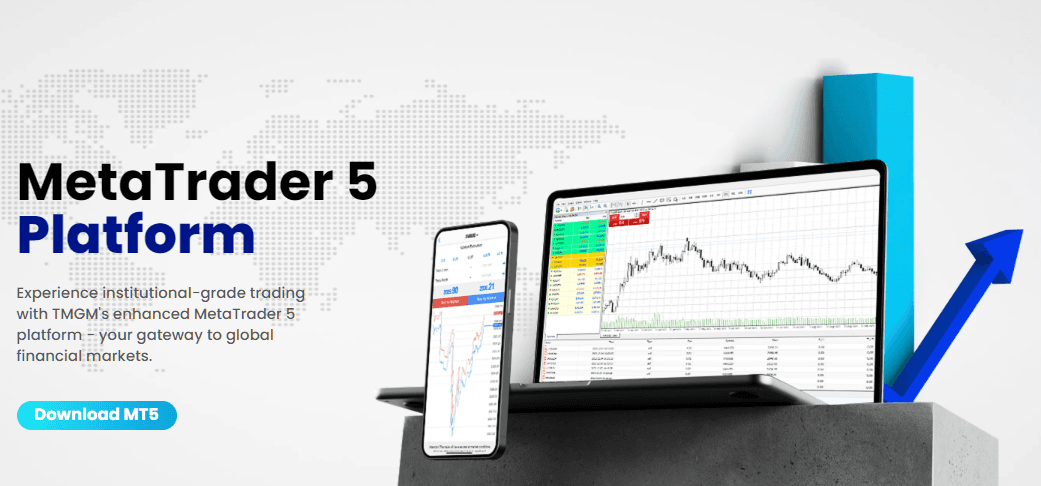
MetaTrader 5 (MT5) is the more advanced MetaTrader platform offered by TMGM.
Although MT4 remains popular, MT5 provides a broader range of analytical and order-management features. This makes it particularly attractive if you plan to become more active or trade multiple markets as your experience grows.
TMGM states that its MT5 platform provides access to more than 100 financial instruments, including Forex, indices and commodities, depending on the applicable account and jurisdiction.
Key MT5 Features
TMGM MT5 includes:
- 80+ technical indicators and analytical tools
- 21 timeframes
- Market Depth (DOM)
- Advanced pending orders
- Economic and trading calendar
- Expert Advisors
- Strategy testing
- Hedging and netting support
- Desktop, WebTrader and mobile access
The additional tools can be particularly useful for traders who rely heavily on technical analysis.
MT5 also supports Expert Advisors, so traders interested in automated strategies are not limited to MT4.
Who Is MT5 Best For?
MT5 is particularly suitable for:
- Intermediate traders
- Advanced Forex traders
- Multi-asset traders
- Technical-analysis users
- Algorithmic traders
- Traders who want more advanced order types
For beginners, MT5 may take slightly longer to learn than MT4. However, choosing MT5 from the beginning can make sense if you want a platform that offers more advanced functionality as your trading skills develop.
Want a trading platform you can grow into?
Open a TMGM account and explore the advanced features available through MT5.
TMGM App: Mobile Trading and Account Management
The TMGM App is TMGM’s proprietary mobile application.
Unlike MT4 and MT5, which are primarily full-featured trading platforms, the TMGM App focuses on combining mobile trading with convenient account management.
This makes it particularly useful for traders who want to monitor markets, manage positions and access their account from a smartphone.
Key TMGM App Features
According to TMGM, the app includes:
- Real-time market information
- TradingView-powered charts
- Technical-analysis tools
- Economic calendar
- Copy trading
- Take-profit and stop-loss functionality
- Deposit and withdrawal management
- Fund transfers
- Biometric login
- Additional account security features
The TradingView-powered charts are especially useful for traders who want more than basic mobile charting.
The app also brings account-related functions into the same mobile environment, reducing the need to switch between different services when managing your TMGM account.
Who Is the TMGM App Best For?
The TMGM App is particularly useful for:
- Mobile-first traders
- Beginners who prefer a simple mobile interface
- Traders who frequently monitor open positions
- Users who want convenient account management
- Traders who want access to their account while away from their computer
However, if you rely heavily on Expert Advisors or advanced desktop analysis, MT4 or MT5 remains the more appropriate primary platform.
MT4 vs MT5 vs TMGM App: Which Is Better?
There is no single platform that is best for every trader.
The right choice depends on what you actually need.
| Feature | MT4 | MT5 | TMGM App |
|---|---|---|---|
| Beginner-friendly | ★★★★★ | ★★★★☆ | ★★★★★ |
| Technical analysis | ★★★★☆ | ★★★★★ | ★★★★☆ |
| Expert Advisors | Yes | Yes | No |
| Automated trading | Yes | Yes | No |
| Advanced order tools | Good | Excellent | Basic |
| Mobile trading | Yes | Yes | Yes |
| Web trading | Yes | Yes | No |
| Account management | Limited | Limited | Strong |
| Best for | Forex & EAs | Advanced trading | Mobile users |
MT4 vs MT5
The simplest way to think about MT4 and MT5 is:
MT4 = simplicity and a mature Forex/EA ecosystem
MT5 = more advanced analysis and trading functionality
If you only need the basics, MT4 can be enough.
If you want more advanced tools and expect your trading requirements to grow, MT5 may be the better long-term choice.
MT5 vs TMGM App
These platforms serve different purposes.
MT5 is designed for detailed trading and analysis.
The TMGM App focuses more on mobile convenience, trading and account management.
For this reason, you do not necessarily have to choose only one. A trader could use MT5 as the main trading platform and the TMGM App for mobile account access.
Which TMGM Platform Should a Beginner Choose?
If you are opening your first Forex account, the decision can be surprisingly simple.
Choose MT4 if you want:
- A familiar and relatively simple platform
- Forex-focused trading
- Expert Advisors
- A large ecosystem of indicators and strategies
Choose MT5 if you want:
- More technical-analysis tools
- More advanced order functionality
- Multiple asset classes
- A platform that can accommodate more advanced strategies
Choose TMGM App if you want:
- Mobile-first trading
- Simple access to your account
- Convenient fund management
- TradingView-powered mobile charts
Our Overall Recommendation
For a complete beginner who wants to learn traditional Forex trading, MT4 is still a strong choice.
For someone who wants to develop into a more advanced trader, MT5 is arguably the better starting point.
The TMGM App works particularly well as a companion platform, especially for mobile account management and monitoring trades.
Does TMGM Work on Windows, Mac, iPhone and Android?
Yes. TMGM provides multiple ways to access its trading platforms.
Windows
MT4 and MT5 desktop platforms are available for Windows users.
This is the most suitable environment for traders who use multiple charts, indicators, Expert Advisors or other advanced trading tools.
Mac
MT5 provides Mac access, while MT4 on Mac requires additional consideration because MT4 does not have a native macOS version.
If you are a Mac user and are deciding between MT4 and MT5, checking the latest TMGM installation instructions before downloading is recommended.
iPhone and iPad
MT4, MT5 and the TMGM App are available on iOS devices.
This allows traders to monitor markets and manage positions without being tied to a desktop computer.
Android
MT4, MT5 and the TMGM App are also available for Android devices.
Web Browser
TMGM provides WebTrader access for MT4 and MT5, allowing traders to access their trading environment through a web browser without relying exclusively on a desktop application.
Can You Practice Trading Before Depositing?
Yes. For beginners, using a demo account is one of the best ways to become familiar with a trading platform before risking real money.
TMGM states that its MT4 and MT5 demo accounts use $100,000 in virtual funds and are available for 30 days.
A demo account lets you practice:
- Opening and closing positions
- Setting stop-loss and take-profit orders
- Reading price charts
- Using technical indicators
- Testing trading strategies
- Understanding position sizes
- Learning the platform interface
This is particularly useful if you have never used MetaTrader before.
Once you are comfortable with the platform, you can consider moving to a live trading account.
New to Forex trading? Practice first, then trade with confidence.
Open a TMGM account and get familiar with the platform before moving to live trading.
How to Get Started With TMGM
Once you have decided which platform suits you, getting started generally involves a few basic steps:
- Open a TMGM trading account.
- Complete the required identity verification.
- Select your preferred trading platform.
- Fund your account.
- Download MT4, MT5 or the TMGM App.
- Log in and begin trading.
For beginners, there is no need to rush directly into live trading.
A sensible approach is to first understand the platform, practice placing orders and learn how stop-loss and take-profit work.
Then, once you are comfortable, you can move to live trading with an amount you can afford to risk.

Final Verdict: Which TMGM Trading Platform Is Best?
TMGM offers three main platforms, each with a clear purpose.
MT4 is the simplest choice for Forex beginners and traders who use Expert Advisors.
MT5 is better suited to traders who want more advanced analysis, order-management features and broader market access.
TMGM App is ideal for mobile-first traders who want convenient trading and account management from their smartphone.
For most new traders, the decision comes down to one question:
Do you want simplicity or more advanced functionality?
Choose MT4 if simplicity is your priority.
Choose MT5 if you want a platform that can grow with your trading experience.
Use the TMGM App when mobile access and account management are important to you.
Ready to choose your TMGM trading platform?
Open your TMGM account, complete verification and start exploring MT4, MT5 or the TMGM App.
Frequently Asked Questions (FAQ)
Is MT4 or MT5 better for beginners?
MT4 is generally easier for beginners because of its simpler interface. MT5 offers more advanced features and may be a better choice if you want to develop your trading skills over time.
Does TMGM support Expert Advisors?
Yes. TMGM supports Expert Advisors (EAs) on its MetaTrader platforms, allowing traders to use automated trading strategies.
Can I trade with TMGM on my phone?
Yes. MT4, MT5 and the TMGM App provide mobile access on iOS and Android devices.
Does TMGM offer WebTrader?
Yes. TMGM provides WebTrader access for MT4 and MT5, allowing you to access your trading environment through a web browser.
Can I use a TMGM demo account?
Yes. TMGM provides MT4 and MT5 demo accounts with virtual funds so that beginners can practice trading before using real money.
Which TMGM platform should I choose?
For a simple Forex trading experience, MT4 is a good choice. For more advanced analysis and trading functionality, MT5 is generally the better option. The TMGM App is ideal for mobile trading and account management.