
Looking to start trading Forex with HFM but not sure how to open an account?
This beginner-friendly guide explains the complete HFM account opening process step-by-step, including:
- How to register a HFM account
- Which account type to choose
- MT4 vs MT5 differences
- Important settings you cannot change later
- Identity verification requirements
- Common mistakes beginners make
- How to create additional trading accounts
By the end of this guide, even complete beginners will be able to open a HFM trading account confidently and avoid costly setup mistakes.
- What is HFM?
- Why Open a HFM Account?
- Before You Open a HFM Account
- Step 1: Visit the Official HFM Website
- Step 2: Complete the Registration Form
- Step 3: Verify Your Email Address
- Step 4: Access the HFM Client Area
- Step 5: Choose Your HFM Account Type Carefully
- Step 6: Select Your Account Currency
- Step 7: Set Your Leverage
- Step 8: Upload Verification Documents (KYC)
- Step 9: Wait for Approval
- Step 10: Deposit Funds
- Step 11: Download MT4 or MT5
- What If You Chose the Wrong Account Settings?
- How Many HFM Accounts Can You Open?
- Common Beginner Mistakes When Opening a HFM Account
- Is HFM Good for Beginners?
- HFM Demo Account vs Live Account
- Frequently Asked Questions
- Final Verdict: Is Opening a HFM Account Worth It?
What is HFM?
HFM is a global Forex and CFD broker formerly known as HotForex.
HFM is popular among beginner and intermediate traders because it offers:
- Low minimum deposit requirements
- MT4 and MT5 platforms
- High leverage options
- Multiple account types
- Copy trading features
- Fast account opening process
- Support for many countries worldwide
HFM provides access to:
- Forex
- Gold and silver
- Indices
- Stocks
- Commodities
- Cryptocurrencies
- ETFs
For many traders, HFM is considered a beginner-friendly broker thanks to its simple onboarding process and flexible trading conditions.
Why Open a HFM Account?
Here are some key reasons traders choose HFM:
| Feature | HFM Advantage |
|---|---|
| Minimum Deposit | Low entry barrier |
| Platforms | MT4 & MT5 available |
| Leverage | Flexible leverage options |
| Account Types | Multiple options for different trading styles |
| Copy Trading | Available |
| Islamic Account | Supported in many regions |
| Mobile Trading | HFM App + MetaTrader apps |
| Demo Account | Free practice account |
Before You Open a HFM Account
Before starting registration, prepare the following:
Required Documents
You usually need:
- Passport OR government-issued ID
- Proof of address document
- Email address
- Mobile phone number
Accepted Proof of Address Documents
Examples include:
- Utility bill
- Bank statement
- Government-issued letter
Most documents should be issued within the last 3–6 months.
Step 1: Visit the Official HFM Website
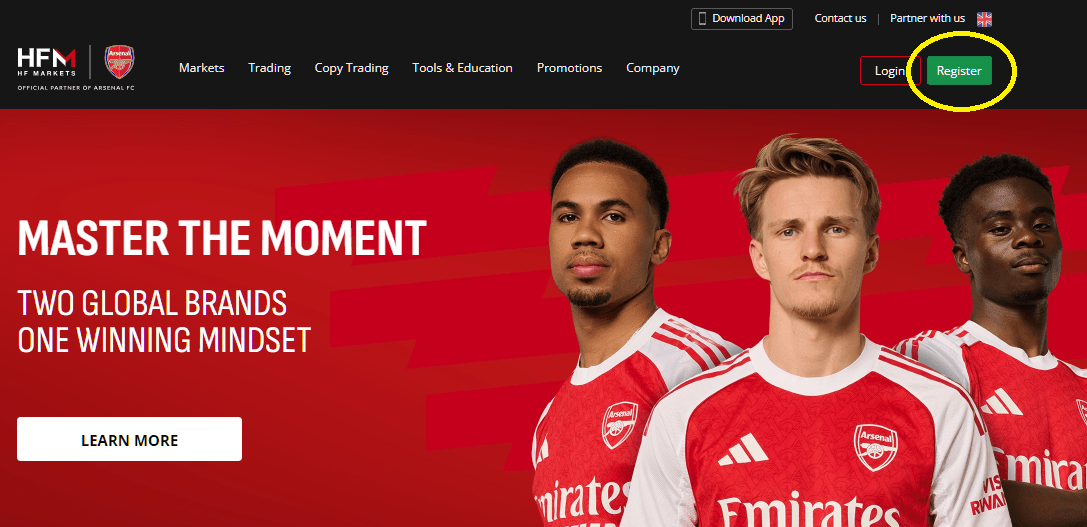
Go to the official HFM website and click the “Register” or “Open Live Account” button.
Step 2: Complete the Registration Form
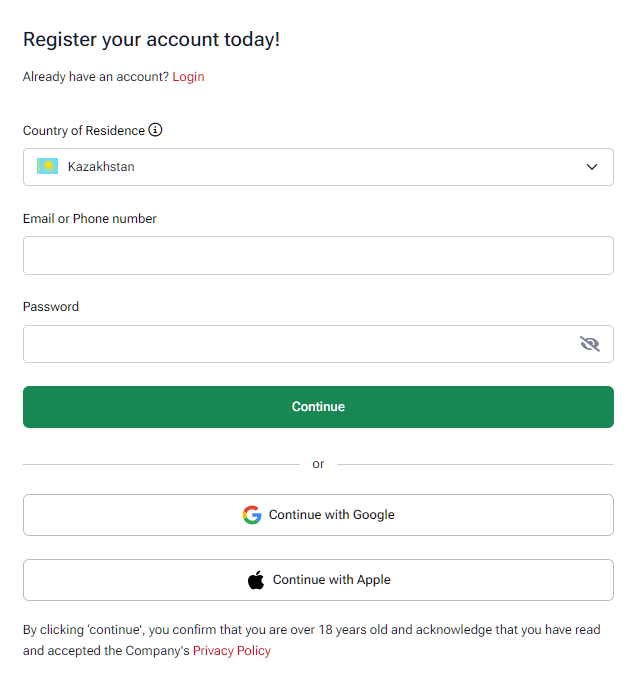
You will be asked to enter:
- Country of residence
- Full name
- Email address
- Phone number
- Password
Important Tips
Use Real Information
Your personal information must exactly match your identity documents.
If the information does not match, verification may fail later.
Use a Valid Email Address
HFM will send:
- Verification emails
- Login information
- Trading account details
- Security notifications
Step 3: Verify Your Email Address
After registration, HFM will send a confirmation email.
Click the verification link to activate your account.
If you cannot find the email:
- Check your spam folder
- Wait a few minutes
- Request another verification email
Step 4: Access the HFM Client Area
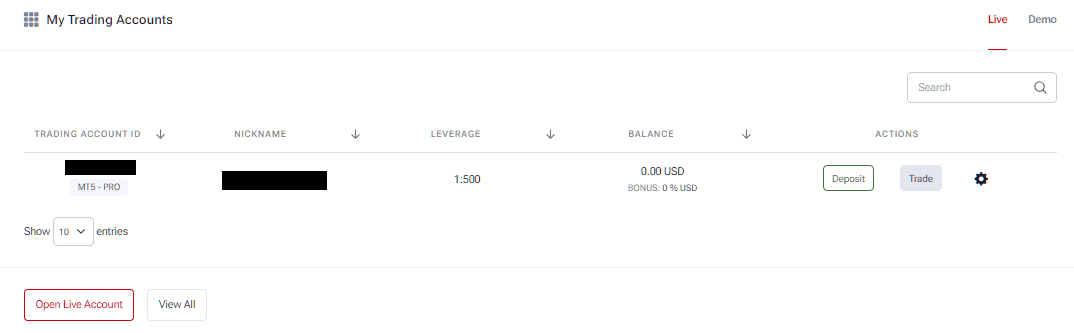
After email verification, log in to the HFM Client Area.
Inside the dashboard, you can:
- Open trading accounts
- Upload verification documents
- Deposit funds
- Download MT4/MT5
- Manage leverage
- Create additional accounts
Step 5: Choose Your HFM Account Type Carefully
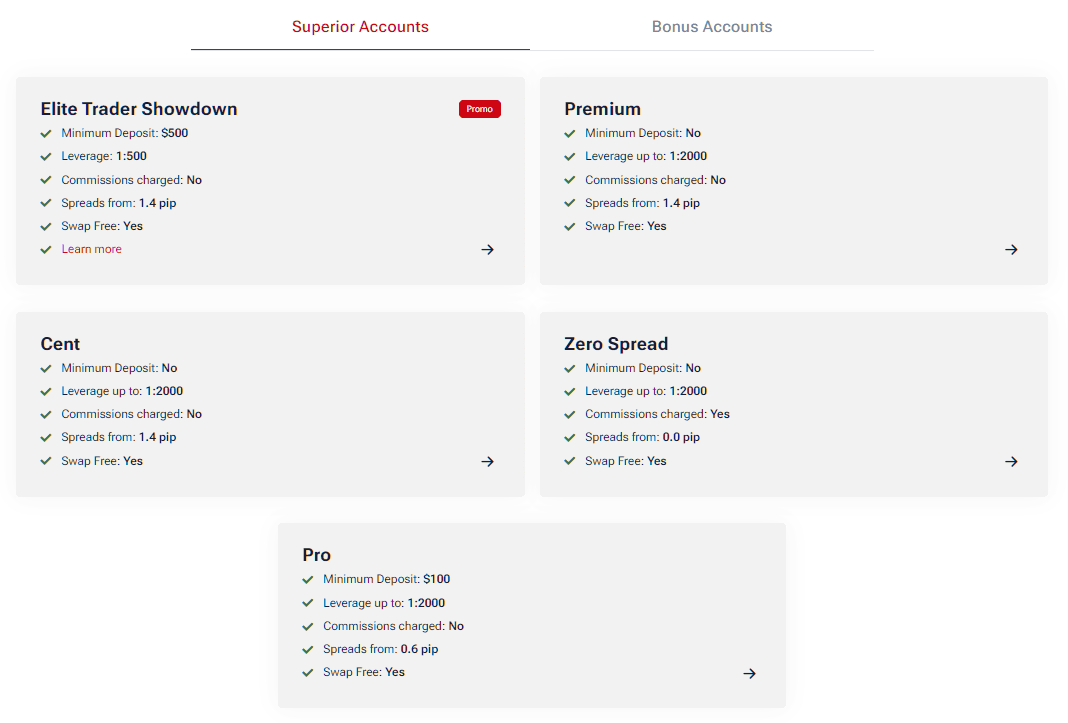
This is one of the most important steps.
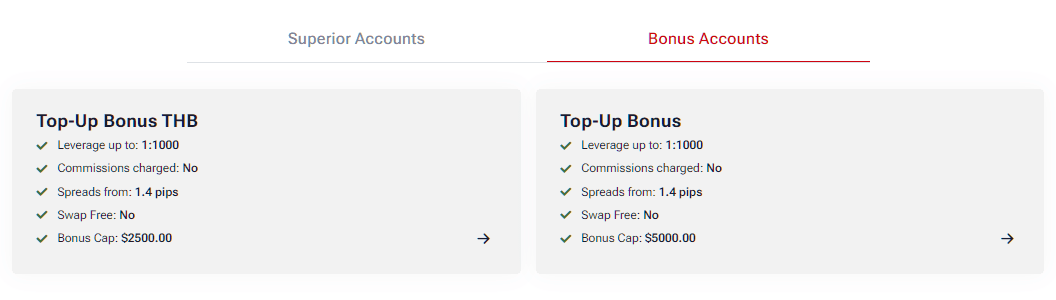
Some account settings cannot be changed later after the account is created.
Main HFM Account Types
| Account Type | Best For |
|---|---|
| Cent Account | Complete beginners |
| Premium Account | General Forex traders |
| Zero Account | Low-spread traders |
| Pro Account | Experienced traders |
Important: Settings You Usually Cannot Change Later
Many beginners make mistakes here.
The following settings are often difficult or impossible to change after account creation:
| Setting | Can Be Changed Later? |
|---|---|
| Account Type | Usually No |
| Trading Platform (MT4/MT5) | No |
| Account Currency | No |
| Base Account Configuration | Usually No |
Choose MT4 or MT5 Carefully
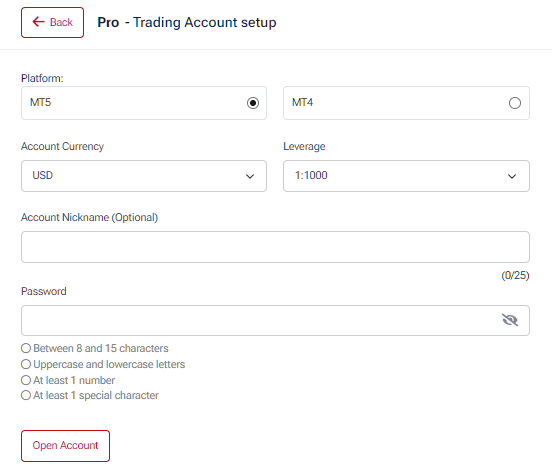
MT4
Best for:
- Beginners
- Traders using older EAs
- Simpler trading environment
MT5
Best for:
- Advanced traders
- More indicators and tools
- Faster strategy testing
- Expanded market access
If you select the wrong platform, you usually need to create a new trading account later.
Settings That CAN Usually Be Changed Later
Fortunately, some settings are flexible.
| Setting | Usually Changeable |
|---|---|
| Leverage | Yes |
| Password | Yes |
| Personal Information | Sometimes |
| Additional Accounts | Yes |
This means beginners should focus mainly on choosing the correct:
- Account type
- MT4 or MT5
- Account currency
Step 6: Select Your Account Currency
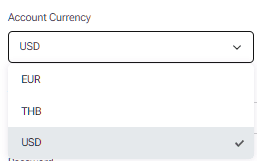
Typical options include:
- USD
- EUR
- Other local currencies
Important Warning About Account Currency
Your account currency usually cannot be changed later.
This matters because it affects:
- Deposit conversions
- Withdrawal conversions
- Trading calculations
- Swap and profit display
For example:
- Japanese traders often choose JPY
- International traders commonly choose USD
If you select the wrong currency, you may need to open a new account.
Step 7: Set Your Leverage
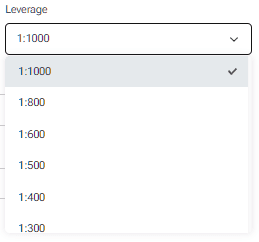
HFM allows flexible leverage depending on region and regulations.
Common leverage options may include:
- 1:100
- 1:500
- 1:1000
- Higher in some jurisdictions
Beginner Recommendation
New traders should avoid using maximum leverage immediately.
Higher leverage increases both:
- Potential profits
- Potential losses
A moderate leverage setting is usually safer for beginners.
Step 8: Upload Verification Documents (KYC)
To fully activate your account, upload:
Proof of Identity
Examples:
- Passport
- National ID card
- Driver’s license
Proof of Address
Examples:
- Utility bill
- Bank statement
Common Verification Mistakes
Avoid:
- Blurry images
- Cropped documents
- Expired IDs
- Different names between documents
These mistakes often delay account approval.
Step 9: Wait for Approval
Verification can sometimes be completed quickly, but timing depends on:
- Document quality
- Region
- Compliance review volume
Once approved, your account becomes fully operational.
Step 10: Deposit Funds
After approval, you can deposit funds using available payment methods.
Typical methods may include:
- Bank transfer
- Credit/debit card
- E-wallets
- Local payment solutions
Step 11: Download MT4 or MT5
You can trade using:
- Windows
- Mac
- iPhone/iPad
- Android
- WebTrader
Platform Recommendation for Beginners
Most beginners start with:
- MT4
- Mobile trading apps
because they are simpler and widely supported.
What If You Chose the Wrong Account Settings?
Good news: you can create additional trading accounts inside the HFM Client Area.
This is extremely useful if you accidentally selected:
- Wrong account currency
- Wrong platform
- Wrong account type
How to Fix Incorrect Account Setup
Simply:
- Log into HFM Client Area
- Create an additional trading account
- Select the correct settings
- Use the new account instead
How Many HFM Accounts Can You Open?
HFM allows multiple trading accounts under one client profile.
This is useful for:
- Testing strategies
- Using different currencies
- Separating manual and EA trading
- Trying different leverage settings
However, there may be maximum account limits depending on:
- Region
- Regulation
- Account type
Most traders will not reach these limits under normal usage.
Common Beginner Mistakes When Opening a HFM Account
Choosing the Wrong Platform
Many beginners select MT5 without realizing their EA only supports MT4.
Selecting the Wrong Currency
Changing account currency later is usually impossible.
Using Fake Information
This can cause verification failure and withdrawal problems.
Uploading Poor-Quality Documents
Blurry images are one of the most common approval delays.
Using Excessive Leverage
High leverage increases risk significantly.
Is HFM Good for Beginners?
HFM is generally considered beginner-friendly because it offers:
- Low barriers to entry
- Educational content
- Demo accounts
- Multiple account types
- Flexible trading conditions
The Cent Account is especially popular among beginners because it allows smaller position sizes and lower trading risk.
HFM Demo Account vs Live Account
Demo Account
Best for:
- Practicing
- Testing strategies
- Learning MT4/MT5
Live Account
Best for:
- Real trading
- Real profits and losses
- Full market experience
Beginners are strongly encouraged to test the platform with a demo account first.
Frequently Asked Questions
How long does HFM account opening take?
Basic registration only takes a few minutes, but verification timing varies depending on document review.
Can I open multiple HFM accounts?
Yes. HFM allows additional trading accounts under one profile.
Can I change MT4 to MT5 later?
Usually no. You typically need to create a new trading account.
Can I change my account currency later?
Usually no. You may need to create another account.
Does HFM offer a demo account?
Yes. Demo accounts are available for practice trading.
What is the best HFM account type for beginners?
Many beginners start with the Cent Account or Premium Account.
Final Verdict: Is Opening a HFM Account Worth It?
For beginners looking for:
- Flexible account options
- MT4 and MT5 support
- Low entry requirements
- Multiple trading products
HFM remains a strong choice in 2026.
The account opening process is relatively straightforward, but choosing the correct settings during registration is extremely important because some options cannot be changed later.
By following the step-by-step process in this guide, beginners can avoid the most common mistakes and start trading more smoothly.