Opening an account with Exness is relatively simple, but many beginners make critical mistakes during the registration process that can affect their trading experience later.
In this guide, we’ll walk through the exact steps to open an Exness account, explain the available account types, highlight important settings you cannot change later, and show how to avoid common registration mistakes.
Whether you are completely new to Forex trading or switching from another broker, this article will help you create the right Exness account from the beginning.
Why Traders Choose Exness
Before opening an account, it’s important to understand why Exness has become one of the most popular Forex brokers globally.
Key reasons traders choose Exness include:
- Low spreads and competitive trading conditions
- Fast deposits and withdrawals
- Support for MetaTrader 4 (MT4) and MetaTrader 5 (MT5)
- Multiple account types for beginners and professionals
- High leverage availability depending on region and conditions
- Instant withdrawals in many countries
- 24/7 customer support
For beginners, Exness is especially attractive because the registration process is fast and the minimum deposit can be relatively low depending on the payment method and account type.
Open an Exness Account: Step-by-Step Tutorial
Step 1: Visit the Official Exness Website
Go to the official Exness website:
Step 2: Click “Register”
On the homepage, click the “Register” button located in the top-right corner.
You will then be asked to enter:
- Country of residence
- Email address
- Password
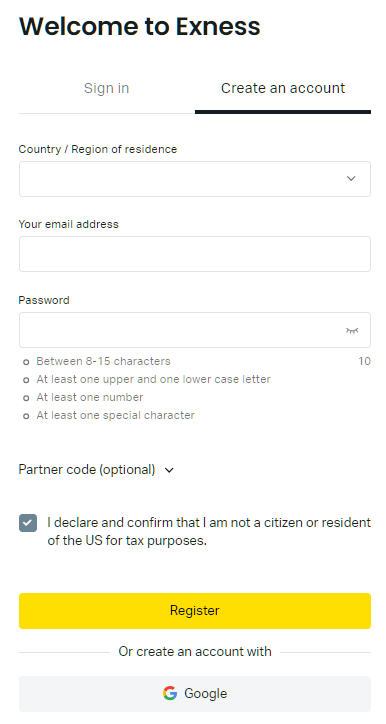
Important Notes
- Use your real country of residence.
- Use an email address you can access permanently.
- Your password should meet Exness security requirements.
After completing the form, click “Continue”.
Step 3: Access Your Personal Area
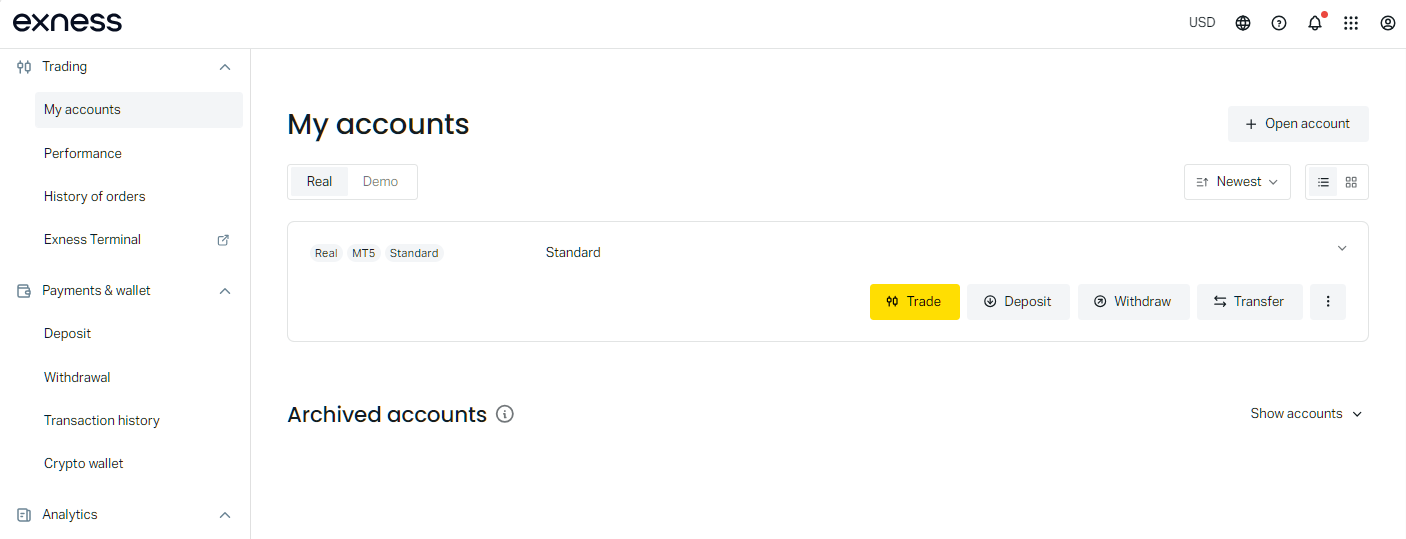
Once registered, Exness automatically creates your Personal Area.
This dashboard is where you can:
- Open trading accounts
- Deposit and withdraw funds
- Verify your identity
- Manage leverage settings
- Download trading platforms
- Create additional accounts
At this stage, your account is not fully verified yet.
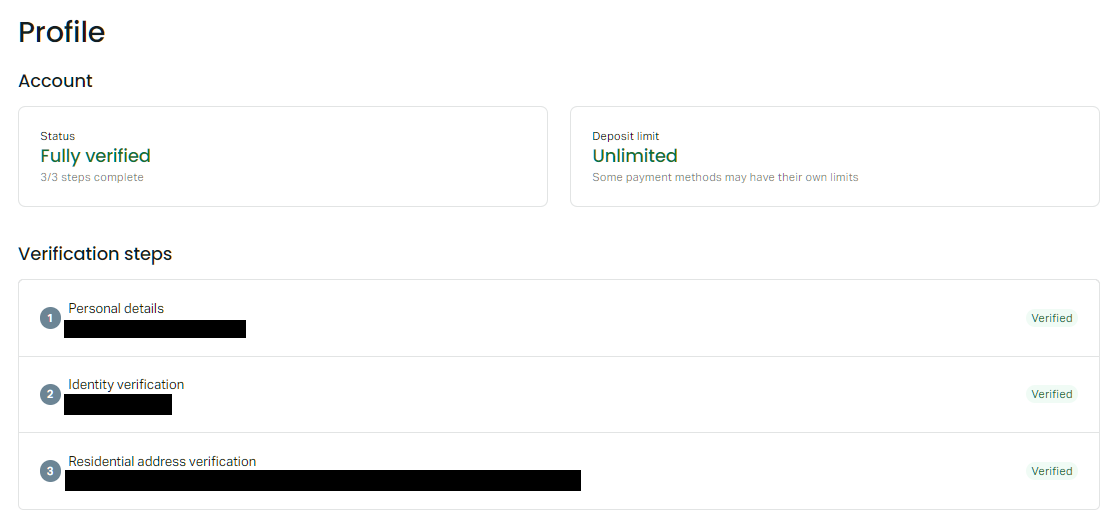
Step 4: Complete Identity Verification (KYC)
To fully activate your Exness account and remove limitations, you must complete KYC verification.
Typically required documents include:
Proof of Identity
Examples:
- Passport
- National ID card
- Driver’s license
Proof of Address
Examples:
- Bank statement
- Utility bill
- Government-issued document
Common Verification Mistakes
- Uploading blurry images
- Using expired documents
- Name mismatch between documents
- Editing or cropping documents excessively
Verification is usually processed quickly, but delays can occur if documents are unclear.
Step 5: Choose Your Exness Account Type
Exness offers several account types designed for different trading styles.
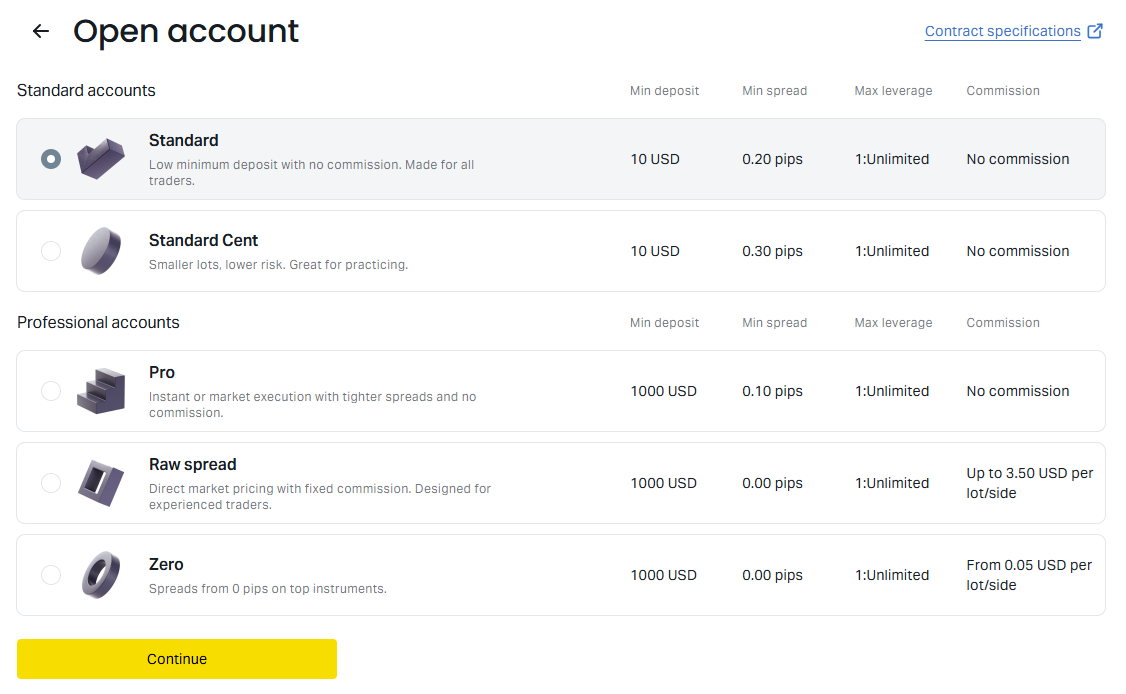
Here is a simple overview:
Standard Account
Best for:
- Beginners
- Casual traders
- Traders wanting simple conditions
Features:
- No commission
- Floating spreads
- User-friendly setup
Standard Cent Account
Best for:
- Practice with small capital
- New traders testing strategies
Features:
- Smaller contract sizes
- Lower risk exposure
Raw Spread Account
Best for:
- Scalpers
- Professional traders
Features:
- Very low spreads
- Commission charged per trade
Zero Account
Best for:
- Traders needing zero spreads on major instruments
Pro Account
Best for:
- Experienced discretionary traders
Features:
- Professional execution conditions

Important: Some Settings Cannot Be Changed Later
This is one of the most important sections of the registration process.
Certain account settings cannot be modified after the account is created.
Settings You Usually Cannot Change Later
Trading Platform
You generally cannot switch between MT4 and MT5 after account creation.
If you selected MT4 but later want MT5, you will need to create a new trading account.
Account Type
You cannot convert a Standard account into a Raw Spread or Pro account later.
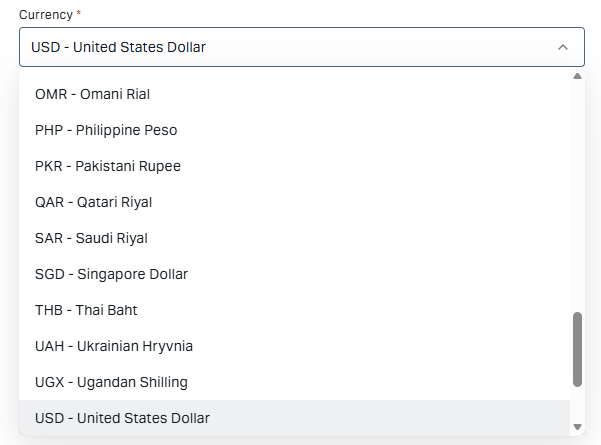
Account Currency
Base account currency usually cannot be changed after creation.
For example:
- USD → cannot later become EUR
- JPY → cannot later become USD
This is extremely important because currency conversion fees may affect deposits and withdrawals.
Settings That Can Usually Be Changed Later
Some settings are flexible.
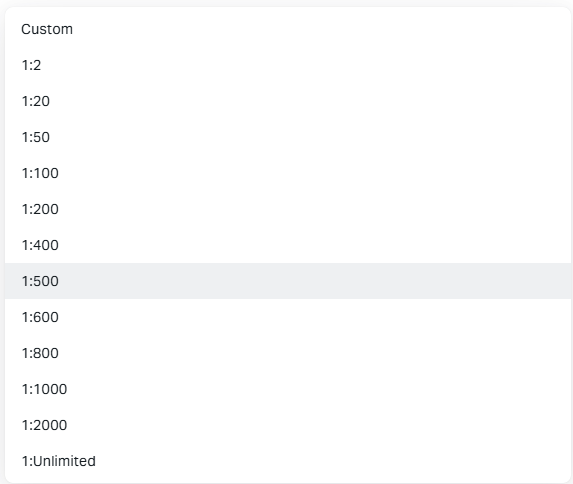
Leverage
Leverage can usually be adjusted later from the Personal Area, depending on:
- Account equity
- Trading activity
- Regulatory limitations
Passwords
Trading passwords and investor passwords can be changed anytime.
Personal Information
Some profile information may be updated through support or verification processes.
Made a Mistake? You Can Open Additional Accounts
One advantage of Exness is that traders can create additional trading accounts inside the same Personal Area.
So if you accidentally selected:
- The wrong platform
- Wrong currency
- Wrong account type
You do NOT need to create an entirely new Exness profile.
Instead, simply create another trading account from your dashboard.
How to Create an Additional Exness Account
Inside the Personal Area:
- Click “Open New Account”
- Select account type
- Choose MT4 or MT5
- Select account currency
- Configure leverage
This process usually takes only a few minutes.
Is There a Maximum Number of Exness Accounts?
Exness allows multiple trading accounts under one Personal Area, but limits may apply depending on:
- Region
- Verification status
- Account activity
- Platform rules
In practice, most retail traders will not reach the limit.
However, opening excessive inactive accounts may trigger internal reviews.
Common Mistakes Beginners Make When Opening an Exness Account
Avoiding these mistakes can save significant time later.
Choosing the Wrong Base Currency
This is one of the most common issues.
If your bank account is in JPY but your Exness account is in USD:
- Currency conversion fees may apply
- Deposit/withdrawal costs may increase
Choose a base currency matching your primary payment method whenever possible.
Selecting MT4 vs MT5 Without Understanding the Difference
MT4:
- Simpler
- More beginner-friendly
- Large EA ecosystem
MT5:
- More advanced features
- More timeframes
- Additional order functionality
If uncertain, many beginners start with MT4.
Ignoring Verification Until Withdrawal Time
Some traders delay KYC verification and later face withdrawal restrictions.
It’s best to complete verification immediately after registration.
Using Incorrect Personal Information
Always use:
- Your legal name
- Accurate birth date
- Correct residential address
Mismatch issues can delay withdrawals significantly.
Which Exness Account Type Is Best for Beginners?
For most beginners, the best choices are:
Standard Account
Good balance of:
- Simplicity
- Low costs
- Ease of use
Standard Cent Account
Ideal for:
- Learning risk management
- Testing strategies with minimal exposure
If you later become more experienced, you can open additional professional account types.
Exness Minimum Deposit
The minimum deposit depends on:
- Account type
- Payment method
- Region
Some payment systems allow traders to start with a relatively small amount.
However, trading with extremely low capital can increase risk exposure due to leverage.
Final Thoughts
Opening an Exness account is straightforward, but choosing the correct settings during registration is extremely important.
Before creating your account, pay close attention to:
- Account type
- MT4 vs MT5
- Base account currency
Since some settings cannot be changed later, taking a few extra minutes during setup can prevent major inconvenience in the future.
The good news is that Exness allows traders to create additional trading accounts easily, so mistakes can usually be corrected without creating an entirely new profile.
If you are ready to begin Forex trading, Exness remains one of the most beginner-friendly brokers available today.